
Now Playing
Amee shows whatever’s currently playing anywhere on your Mac — Music, Spotify, a browser tab, any app that reports now-playing info to macOS — with title, artist, album, artwork, playback position, and play/pause/next/previous/seek controls, all from the floating mini player.
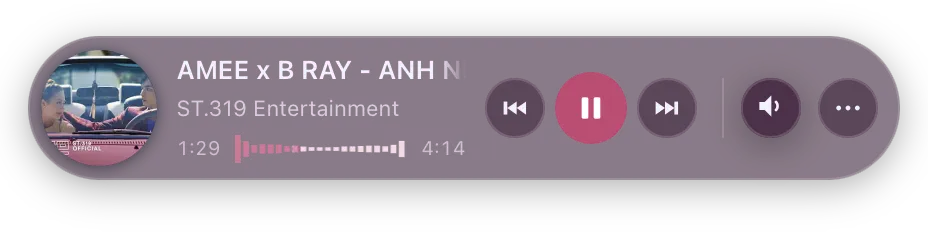
No extra permission prompt is needed for this — it works out of the box.
Where the information comes from
Section titled “Where the information comes from”Two sources feed this, and the mini player shows whichever one has something to say:
- macOS’s now-playing session, which covers every app — Spotify, Music, VLC, and browsers most of the time. No setup, no permission.
- The Amee browser extension, optional. It’s the only source that can see browser media once a video is popped out into Picture-in-Picture, because Chromium leaves the OS session entirely at that moment — so without it a popped-out video reads as “nothing playing”. It’s also what lets Amee identify the exact tab rather than just the browser.
Everything below works the same on either path.
Playback controls
Section titled “Playback controls”Use the mini player’s transport controls to play, pause, skip to the next/previous track, or seek to a position in the current track. These send the same commands as clicking play/pause inside whatever app is actually playing.
Bringing the source app to the foreground — some skins offer a button to jump straight to whichever app is currently playing (launching it first if it isn’t already running). A toggle variant is also available: if the now-playing app is already frontmost, it jumps back to whatever app you were in before, so repeated presses switch back and forth. With the browser extension connected, a skin can raise the exact tab instead of just the browser. See openNowPlayingApp(), toggleNowPlayingApp() and focusNowPlayingTab() in the SDK reference.
Always return to the app I toggled from (Dashboard → General → Mini player) controls what “back” means after you’ve toggled to the now-playing app. Off (default): if you manually switch to some other app in between, the next toggle treats that as a fresh switch. On: the toggle always returns you to the original app you toggled from, even if you’ve been somewhere else since.
Auto-hide when idle
Section titled “Auto-hide when idle”Turning on Auto hide when not playing (Dashboard → General → Mini player) makes the floating mini player hide itself after 10 seconds of nothing playing, and reappear the moment playback resumes. Hovering the mini player or clicking into it restarts that countdown rather than cancelling it, so parking your cursor over an idle player keeps it visible — it still hides a little after you actually look away. Manually showing or hiding it from the menu-bar icon is remembered separately, so this feature never silently undoes a manual choice.
Skins can register callbacks for these transitions: amee.onShow(cb) fires when the mini player becomes visible again (playback resumed, tray icon clicked), and amee.onHide(cb) fires right before the window actually hides — giving a skin time to prime its own UI for a clean reappearance. A skin can also hide the mini player itself by calling amee.hide(). See the SDK reference.
Auto-pause on quit
Section titled “Auto-pause on quit”Auto pause currently playing music when app quits (on by default, Dashboard → General → App) sends a pause command to whatever’s playing right before Amee exits — so quitting Amee doesn’t leave music running behind a closed app by surprise.